 By Ethan Brooks
Updated November 2026
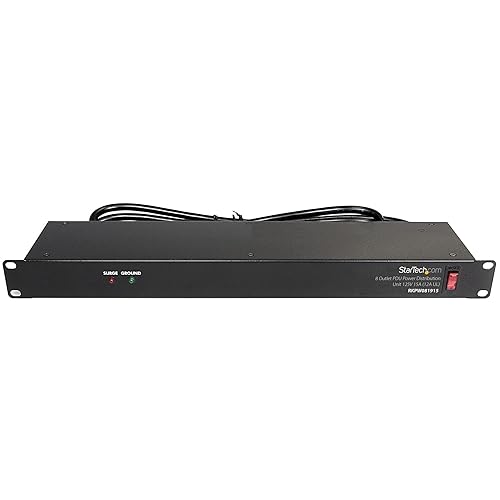
An APC rack power strip is a rack-mounted power distribution unit that gives your equipment clean, organized outlets inside a standard 19-inch cabinet. This guide shows you how to match the strip to your load, mount it correctly, and avoid the wiring mistakes that cause tripped breakers and overheated cords. The same principles apply whether you are powering a home server or running lights, a fan and a few accessories around a gym rack.
Check Your Load and Outlet Needs First
Before you buy, add up the wattage of everything you plan to plug in. Look at the nameplate or label on each device, which usually lists watts or amps. Keep the total under about 80 percent of the strip’s rated capacity, since continuous loads should not run at the maximum rating. Count outlets too, and leave two or three spare for future expansion.
Shopping for one? See our guide: Power Strip Server Rack Review: Features and Performance.
Pay attention to the plug type and the cord length. Rack strips are often sold with a fixed cord that exits either the top or the bottom of the unit, so decide where your power source sits relative to the rack. A cord that is too short forces an extension cable, which is a common source of trouble.
Mount the Strip Safely in the Rack
- Confirm the strip is 1U or 2U tall and fits your rack’s rail spacing. Standard 19-inch racks use square or threaded holes.
- Mount the strip at the rear of the rack, using the included rack-ear brackets, so the cord and outlets face the back.
- Route the power cord away from moving parts, sharp edges and any area that gets hot.
- Leave a few inches of slack so the rack can be adjusted or moved without strain on the connector.
- Tighten all mounting hardware, then check that the strip does not wobble.
If your rack is in a garage or basement with damp conditions, keep the strip off the floor and away from any water source. Dust and humidity both shorten the life of electrical components.
Wire the Power Correctly and Protect It
Plug the APC rack power strip directly into a wall outlet on a dedicated circuit whenever possible. Avoid daisy-chaining power strips, because this can overload the first strip and creates a fire risk. Most APC rack units include surge protection, but a surge protector does not replace a backup battery if you need uninterrupted operation for servers or network gear. For that, a separate uninterruptible power supply is the right tool.
Check the circuit rating in your home’s breaker panel. A 15-amp circuit is common in US homes, and the combined load of everything on it should stay well below that limit. If you are unsure about the wiring or the load on a circuit, consult a licensed electrician.
Common Mistakes to Avoid
- Plugging a space heater or other high-draw appliance into a rack strip that is not rated for it.
- Running the strip at or near its maximum rated load for long periods.
- Using a cheap extension cord as the main power feed instead of the strip’s own cord.
- Mounting the strip where cables are pinched by doors, rails or weight plates.
- Forgetting to label circuits, which makes troubleshooting harder when something stops working.
Recommended Gear
- Rack-mount surge protector: A rack-mount surge protector with built-in monitoring helps guard sensitive electronics against voltage spikes. View on Amazon
- Cable management kit: Velcro straps and rack cable ties keep the power cord from sagging or snagging. View on Amazon
- Blank rack panels: Filler panels cover unused rack space, which improves airflow around the strip. View on Amazon
Related Reading
If you are building out a larger setup, the guide Rack Mountable Power Strip: A Step-by-Step Guide for Home Gym and Server Setups covers mounting and load planning in more depth. For broader power planning, Rack Mount Power Conditioners: How to Choose and Install One (2026) explains when a conditioner makes sense. Gym builders may also find Power Rack with Safety Bars: 7 Best Picks for Home Gyms (2026) useful for planning overall rack space.
FAQ
Can I plug a rack power strip into another power strip?
It is better not to. Daisy-chaining strips can overload the first unit and creates a fire hazard. Plug the rack strip directly into a wall outlet.
How do I know if my APC rack power strip is overloaded?
Add up the wattage or amp ratings of every connected device and compare the total to the strip’s rated capacity. Keep continuous loads under about 80 percent of that rating, and check the label or manual for the exact specification.
Do I need a UPS as well as a rack power strip?
A rack power strip distributes power and may include surge protection, but it does not provide battery backup. If you need uninterrupted power for servers or network equipment, add a separate uninterruptible power supply.
Conclusion
A well-chosen APC rack power strip keeps your equipment organized, protected and within safe load limits. Calculate your total wattage, mount the strip at the rear of the rack, and plug it into a dedicated wall circuit. Check the manufacturer’s manual for exact ratings before you finalize your setup.
Related reading
Ready to choose one?
About Ethan Brooks
Ethan Brooks is part of our editorial team and reviews and edits our budget home gym equipment guides, checking product details against manufacturer specifications and owner feedback.