 By Ethan Brooks
Updated November 2026
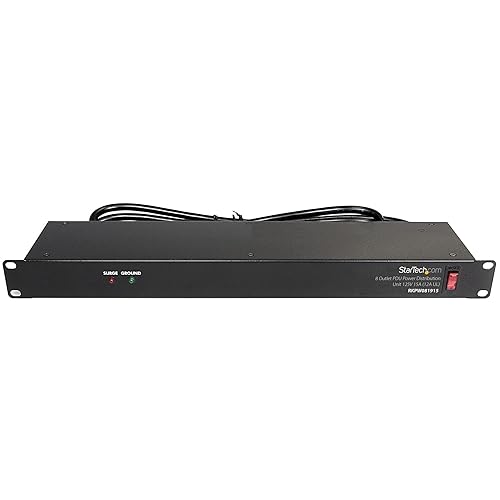
An APC power strip for server rack use gives you clean, rack-mounted power distribution for your servers, switches and storage units. This guide walks through choosing the right unit, mounting it, and wiring it so your equipment stays powered safely. Along the way you will check load limits and avoid the mistakes that cause tripped breakers.
Step 1: Check Your Power Load
Before buying or mounting anything, add up the power draw of every device you plan to plug in. Look at the nameplate or rear-panel label on each unit, which lists watts or amps. Keep your total below roughly 80 percent of the strip’s rated capacity, since continuous loads are what trip breakers over time. If you are unsure of your total, consult a qualified electrician before loading a circuit.
Step 2: Choose the Right Strip Format
APC and similar rack-mount units come in a few common layouts. Match the format to your rack and your outlets:
| Format | Best for | Key consideration |
|---|---|---|
| Vertical (0U side-mount) | Saving rack units | Confirm the depth fits behind your rails |
| 1U horizontal | Simple, even outlet access | Uses one rack unit of space |
| Metered or switched | Monitoring draw per outlet | Check the display and per-outlet control features |
Step 3: Mount the Strip in the Rack
- Confirm the rack’s mounting hole pattern and rail depth. Most 19-inch racks use square or threaded holes.
- Place the strip on the rear rails where cords can reach their devices without strain.
- Secure the strip with the included hardware. Do not let it hang on its cord or rest on other equipment.
- Leave a few inches of clearance for airflow, especially above the strip.
Step 4: Wire and Connect Safely
Plug the strip into a dedicated, grounded outlet rated for the load. Avoid running it through a household extension cord or a second power strip, because these add resistance and fire risk. Route cables with velcro ties rather than tight zip ties, and keep power and network cables separated where possible. Label each outlet with the device it feeds so future maintenance is quicker.
Common Mistakes to Avoid
- Daisy-chaining power strips, which overloads the first strip.
- Ignoring inrush current, since servers often draw more at startup than during normal operation.
- Blocking the rear of the rack, which traps heat around power components.
- Skipping a load calculation after adding new equipment.
- Mounting a strip with a cord under tension, which can loosen connections over time.
Recommended Gear
- APC rack-mount power distribution unit: A manufacturer-built option designed for rack mounting, which matches standard 19-inch hardware. View on Amazon
- Velcro cable ties: Reusable ties that hold cables without crushing them. View on Amazon
- Cage nut and mounting hardware kit: Useful if your rails need extra fasteners for a secure install. View on Amazon
For broader context on rack power planning, see Power Supply for Rack: How to Power Your Server Rack Safely (2026) and Rack Mount Power Conditioners: How to Choose and Install One (2026). If you are comparing models, Power Strip Server Rack Review: Features and Performance covers common features in detail. A general setup walkthrough is also available in Rack Mountable Power Strip: A Step-by-Step Guide for Home Gym and Server Setups.
FAQ
Can I use a standard power strip in a server rack?
Standard strips are not designed for rack mounting and often lack the rated capacity servers need. A rack-mount unit fits 19-inch rails and is built for continuous loads.
How do I know if my strip is overloaded?
Check the metered display if your model has one, or add the device nameplate ratings. Stay below about 80 percent of the rated capacity to leave headroom.
Should I plug a rack power strip into a surge protector?
Generally, connect the strip directly to a wall or dedicated outlet and avoid chaining it. Confirm the approach with your equipment manufacturer or an electrician.
Conclusion
A properly chosen and mounted APC power strip for server rack use keeps your equipment organized and your circuits within safe limits. Calculate your load first, mount the strip securely, and wire it directly to a suitable outlet. Revisit your load total whenever you add hardware.
Ready to choose one?
About Ethan Brooks
Ethan Brooks is part of our editorial team and reviews and edits our budget home gym equipment guides, checking product details against manufacturer specifications and owner feedback.